
Customer Reports
- What These Reports Show
- Outstanding Balances
- Deposits Held
- Top Customers
- New Customers
- Statement
- Owed Against Held
- A Simple Monthly Routine
- Exporting
What These Reports Show
Reports > Customer Reports shows who owes you, who has paid in advance, who buys most, and the account history of one customer. You need the reports.customers permission. The reports are read-only. Balances change only when you record a transaction or complete a credit or deposit sale. See Customers.
Outstanding Balances
Your debt list. It shows every active customer whose balance is above zero: Customer, Phone and Balance Owed, largest first. A Total row sums them. Search with "Name or phone…". If none you see "No customers with outstanding balances."
Use it on the first of the month to chase payments. For example, call Otieno who owes KSh 6,500.
Deposits Held
Money customers paid in advance that you still hold. It shows every active customer whose balance is below zero: Customer, Phone and Deposit Held. A Total row sums them. If none you see "No deposits currently held."
Top Customers
Your highest-spending customers in a period. Pick the dates with From, To, From Time and To Time, and Show top (Top 10, Top 20 or Top 50). Columns: #, Customer, Phone, Transactions and Total Spent.
Only completed sales that have a customer attached are counted. Walk-in sales are not. If none you see "No sales data for selected period."
New Customers
Customers added during the period: Name, Phone, Email and Registered At. The heading shows how many ("5 customer(s) registered"). If none you see "No new customers in selected period."
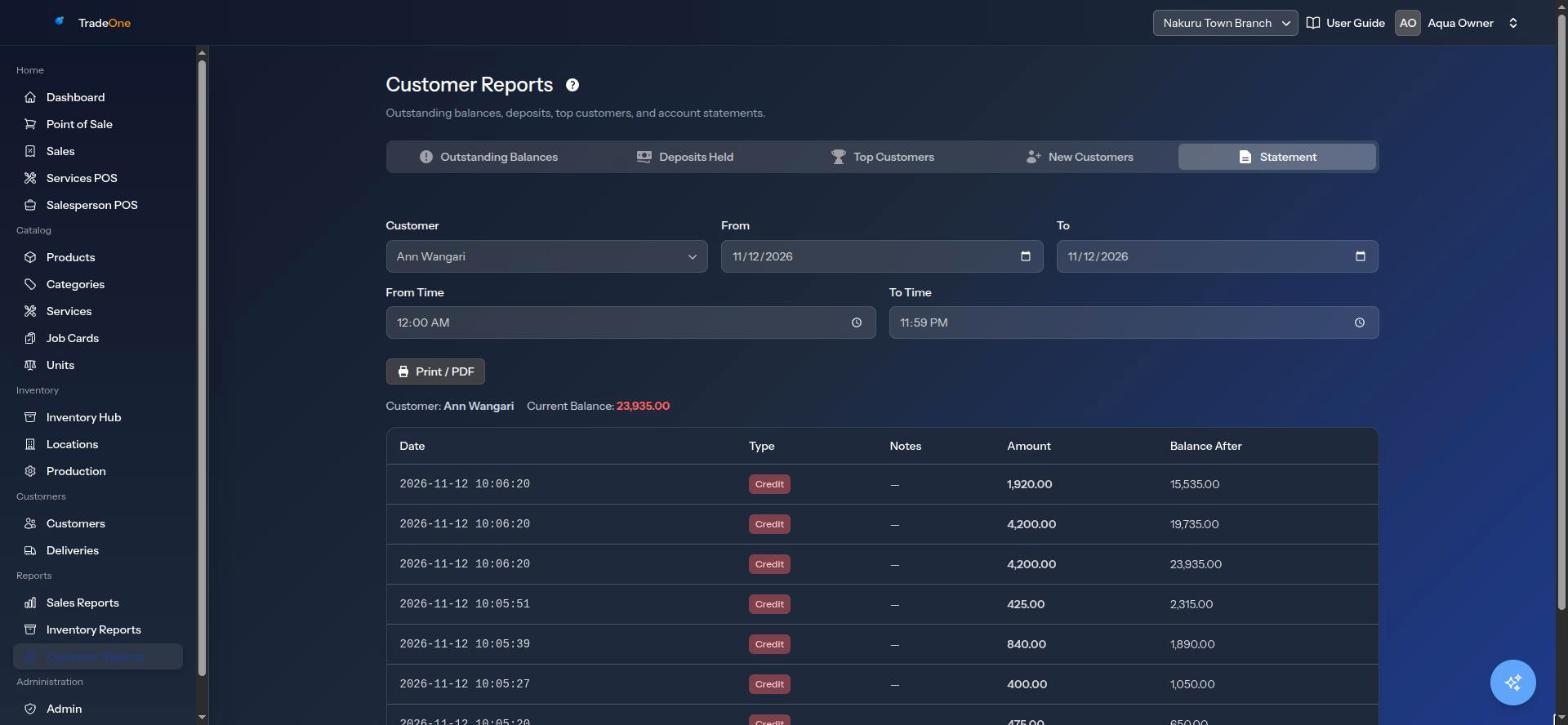
Statement
The full account history of one customer, ready to print.
- Open the Statement tab.
- Choose the customer from "Select a customer…". Until you do, you see "Select a customer to view their statement."
- Choose the dates.
Columns: Date, Type, Amount, Balance After and Notes. At the top you see the Current Balance and the Net movement for the period. If nothing happened you see "No transactions in selected period."
Print it with Print / PDF to hand to the customer when they ask "How much do I owe?".
Owed Against Held
| Meaning | |
|---|---|
| Outstanding Balances | Money customers owe you |
| Deposits Held | Money you may have to give back or supply goods for |
Deposits are not income. They are money held for customers until they use it.
A Simple Monthly Routine
- On the first of the month, open Outstanding Balances and print it. Phone each customer on the list.
- When a customer pays, record a Payment on the Customers page. See Customers.
- Open Top Customers for last month. Thank your best ones. They might deserve a better price.
- Open Deposits Held to see how much prepaid money you are holding.
- If a customer disputes a figure, print their Statement. Every credit, payment and deposit is listed with the balance after it.
A statement shows the balance after every entry. Sale-driven entries come from credit and deposit sales. Entries you made by hand come from Record transaction.
Exporting
Print / PDF is on every tab. Excel is on Outstanding Balances, Deposits Held and Top Customers.