
Units and Categories
Why You Need Them
A unit says how you count an item: pieces, litres, kilograms. A category groups items so you can find them on the till and see them together in reports.
Set up both before you add products. For a water shop you might have units "litre" and "crate", and categories "Drinking Water", "Dispensers" and "Accessories".
Units
Open Catalog > Units (needs products.view). The page is headed "Units of measure". It says "Ships with 12 common units pre-seeded. Add more as needed."
The twelve units that come ready are: pieces (pcs), dozen (dzn), metre (m), centimetre (cm), kilogram (kg), gram (g), litre (L), millilitre (mL), box (box), pack (pk), gigabyte (GB) and terabyte (TB).
Each unit shows its name and its short symbol.
Adding a Unit
Press New unit (needs products.create).
| Field | Notes |
|---|---|
| Name | Required, up to 50 characters, must be unique. For example crate |
| Symbol | Required, up to 10 characters, must be unique. For example crt |
Press Create. You see "Unit created."
Editing and Deleting a Unit
- Edit (needs
products.edit) changes the name or symbol everywhere the unit is used. You see "Unit updated." - Delete (needs
products.delete) asks "Delete this unit?" and then shows "Unit deleted."
Warning
TradeOne lets you delete a unit that is in use. The products that used it will then show "No unit". Edit the unit instead if you only need to fix a spelling.
Categories
Open Catalog > Categories (needs categories.view). The page says "Used to group products on the POS and in reports." The table has the columns Name, Description, Products, Status and Actions. The Products badge shows how many products are in the category.
Use "Search category name..." to find one.
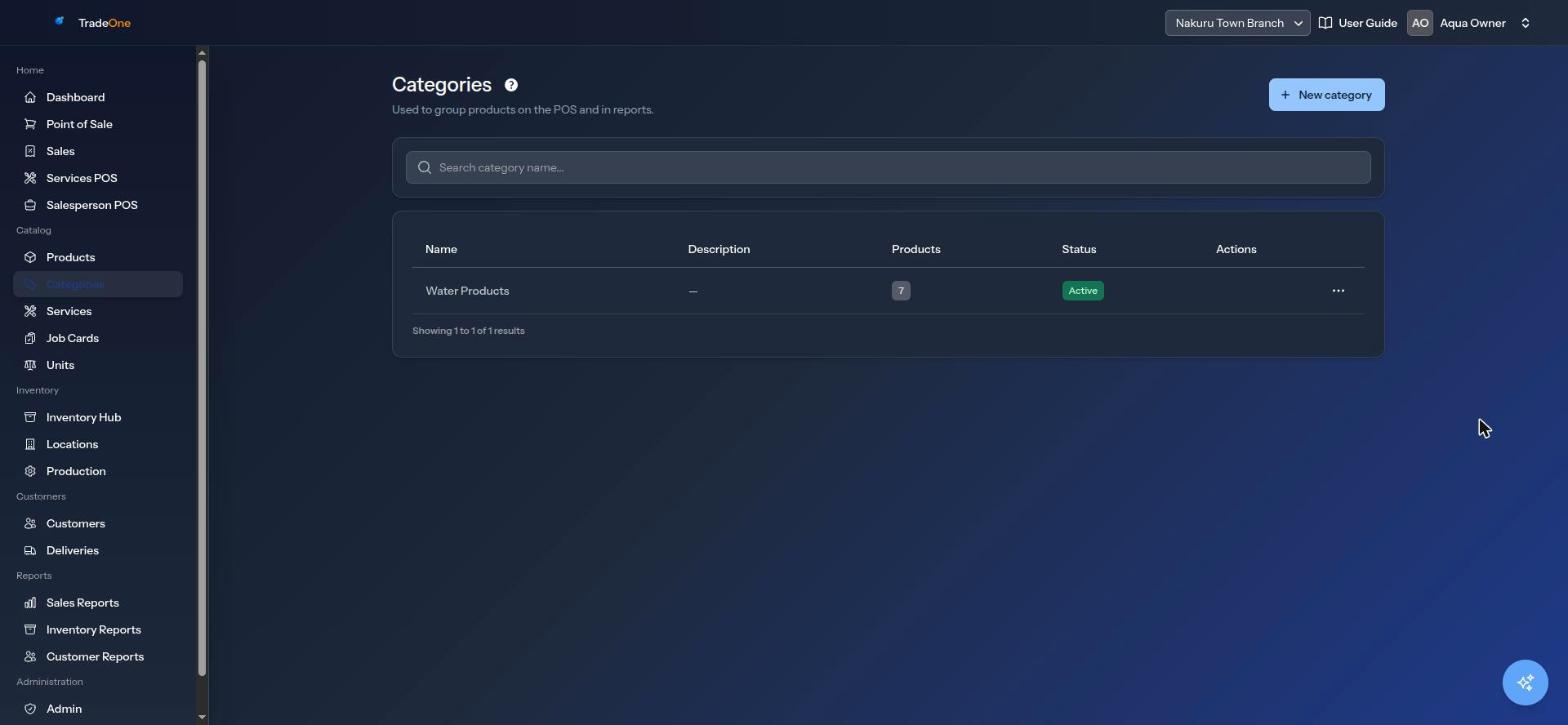
Adding a Category
Press New category (needs categories.create).
| Field | Notes |
|---|---|
| Name | Required, up to 100 characters, must be unique |
| Description | Optional, up to 500 characters |
| Active | Switch off to hide the category in pickers without deleting it |
Press Create. You see "Category created."
Editing a Category
Use the menu on the row and choose Edit (needs categories.edit). You see "Category updated."
Deleting a Category
Choose Delete from the row menu (needs categories.delete). TradeOne asks "Delete this category?" and then says "Category deleted."
You cannot delete a category that still has products. You see "Category has 4 product(s); reassign them first." Open each product, choose another category, and try again. Or switch the category's Active off instead.
Where They Are Used
- On the product form, the Unit is chosen for each variant and the Category for the product. See Products.
- On the till, the category buttons filter the products. See Point of Sale.
- Sales Reports has a By Category tab and a category filter on By Product. See Sales Reports.
- Inventory Reports let you filter by category. See Inventory Reports.