
Inventory Reports
- What These Reports Show
- Stock on Hand
- Low Stock
- Stock Flow
- Movements
- Stock Received
- Purchase Orders
- Which Report Do I Want
- Exporting
What These Reports Show
Reports > Inventory Reports shows your stock position and its history. You need the reports.inventory permission. They are read-only. To change stock, use the Inventory Hub.
There are six tabs. The first two show how things are now. The others cover a date range that you pick. The date controls work as in Sales Reports: From, To, From Time and To Time.
Stock reports show only the locations of the branch you are working in.
Stock on Hand
What you hold right now, per variant and location. Columns: Product, Variant, SKU, Location, Qty on Hand, Order Level and Status. The status is OK, or Low Stock when the quantity is at or below the order level.
Filter with "Search product, variant, SKU or barcode...", All locations and All categories. If nothing is there you see "No stock records found."
The Order Level is the Reorder at you set on the product. See Products.
Stock on Hand shows quantities only. It does not show the value of the stock.
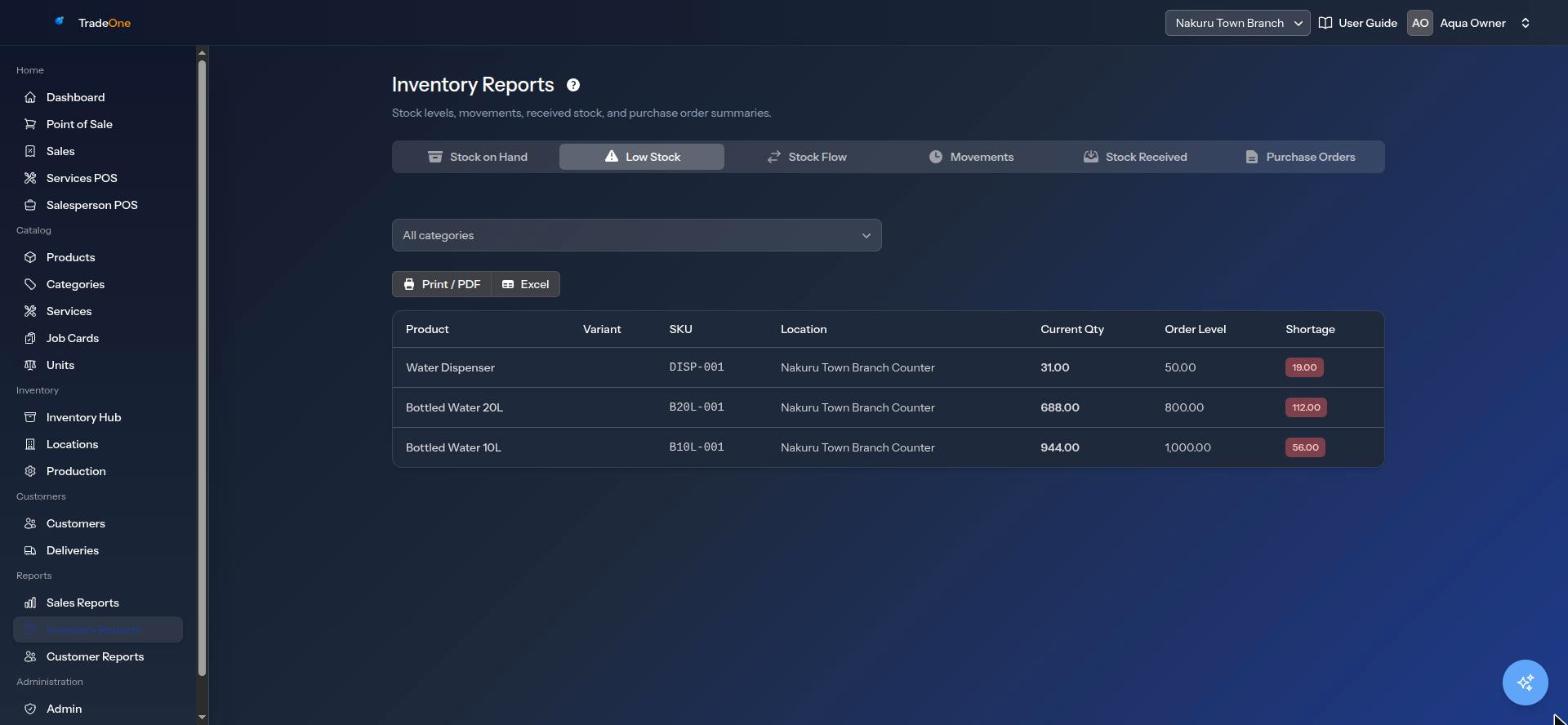
Low Stock
Your shopping list. It shows every variant at a location where the quantity is at or below the order level. Columns: Product, Variant, SKU, Location, Current Qty, Order Level and Shortage. The shortage is Order Level minus Current Qty, and the list starts with the lowest quantity. Filter by All categories.
Example: the order level for 20L bottles is 10, and you have 4 at the counter. The shortage is 6. If nothing is low you see "No low-stock items found."
Note
A variant with Reorder at 0 and no stock also shows here, because 0 is at or below 0.
Stock Flow
Quantity in against quantity out, one row per day. Columns: Date, Received, Sold and Net.
- Received counts stock that came in through received purchases.
- Sold counts units sold at the till and by salespeople.
- Net is Received minus Sold. It is green when more came in than went out.
A Totals row sums the period. If the period is empty you see "No data for selected period." Stock Flow does not count adjustments, transfers, production or voids. Use Movements for those.
Movements
The line-by-line log of every stock change in the period: Date, Product / Variant, SKU, Type, Qty, From, To and Staff. Filter by All locations and All types.
The types you can filter by are: Adjustment, Issue to Staff, Purchase, Return from Staff, Sale, Service Consumption, Transfer and User Sale. If nothing is there you see "No movements for selected period."
Use it to trace what happened to one item. The same history is on Inventory > Inventory Hub > Movements. See Inventory.
Stock Received
Purchases received in the period: Ref #, Supplier, Date Received, Items, Total and Total Value. Filter by All suppliers. If none you see "No stock received in selected period."
Purchase Orders
All purchase orders created in the period: Ref #, Supplier, Date, Status, Ordered, Received and Total. Filter by All statuses (Draft, Received, Cancelled) and All suppliers. If none you see "No purchase orders for selected period."
Which Report Do I Want
| Question | Use |
|---|---|
| How much do I have now? | Stock on Hand |
| What must I order? | Low Stock |
| How did it get to this number? | Movements |
| How much came in and went out each day? | Stock Flow |
| What did I receive from suppliers? | Stock Received |
| What orders have I raised? | Purchase Orders |
Exporting
Most tabs have Print / PDF and Excel buttons. Stock Flow, Stock Received and Purchase Orders have Print / PDF only.